 Setting up a secure password is one of the simplest, and most important things to do to ensure your PC and information stays safe.
If you answer no to 3 or more of the below – it is probably time to change up your passwords:
- Do you use the same password for everything?
- Is your password less then 6 characters?
- Does your password include at least 2 numbers?
- Does your password include atleast 1 symbol like an ! or * or a $ or ?
- Have you updated or reset your password(s) in at least the past year?
Many people wonder if their logins are more secure if they change their passwords regularly. If you have the habit of telling others your password then the answer is yes, change them and change them often!
It is important to keep your passwords secure by adding in random variables, and to not use the same password for important logins (your bank, or an eCommerce store) as you do for potentially unsecure logins like a forum.
The reason is that if on of the sites you are using gets hacked they are most likely to turn around and use your information right away to try to get access to the rest of your digital life.
HINT: If you start seeing strange, small transactions that you don’t remember making – call your credit card company. These could be a hacker sending through test transactions to see if the card is still valid.
Please do us techy types a favor. Stay safe online!
]]> By now, most of you are probably aware that over time your PC’s registry gets full of junk information – which in turn slows down your PC, affects its operability and all in all makes PC Performance Optimization a critical piece to managing your productivity and PC sanity!
What you may not have known is that Microsoft themselves suggest you perform a complete PC Tune Up every 3 months. While you can get yourself into the weeds with do it yourself information on using features within Windows 7 such as those found in this blog post; there are also a number of services out there that will take this burden off of your shoulders. Let’s take a look at what these PC Performance Optimization services/tools should include to ensure you get the best bang for your buck.
Deep Dive Anti-Virus, Anti-Malware and Ant-Spyware Scan
With most popular anti-virus software, you run the risk of the application and its virus definitions (the information that tells the software what to look for) becoming corrupt themselves and thus missing major infections during routine scans. It is very important for whatever PC Optimization service you use that it include standalone anti-virus, anti-malware and anti-spyware scan tool(s) – these tools should install and uninstall during the tune up job in order to keep everything segregated and secure!
We happen to use different tools for each of these steps within our own PC Optimization Service, and are always swapping out/upgrading each tool to make sure our PC Tune ups stay ahead of the curve.
Registry and Hard Drive Optimization
While there are a number of ‘free’ tools out there. It is of utmost importance that whatever PC Performance optimization tool you use that is also include a top notch registry cleaning feature. Our opinion is that any tune up that claims to have both proprietary registry cleaning functionality + proprietary PC security software built into their offering, probably means that one of the two, or sometimes both function very well.
This is why with our Registry and Hard Drive Optimization Tune ups we again bring in various tools to clean various parts of the registry and hard drive to ensure the entire job is completed to industry best practice standards. We feel that using third party tools to supplement the process is the only sure fire way to stay on top of the latest developments, and achieve the best possibly cleaning.
Words of wisdom: Be cautious of any solution that claims to be everything for everyone using their own custom tools. There is a reason why companies like McAfee focus solely on anti-virus, and partner with other organizations for anything outside of that realm. It’s a really, really big job!
Personal Attention over complete Automation
More and more we are seeing completely automated tools marketed as the one stop shop for all of your PC support needs. To be frank, at this stage it is impossible to replace the creative troubleshooting, and analytical ability of a well trained technician. 10 years from now might very well be a different story.
However, for the time being, please make sure that whatever tool you choose includes at least partial intervention from a technician in the form of Online or Remote PC Tech Support via Phone and/or Chat.
We have chosen to build these processes in with our PC Tune Up services, and require our technicians to monitor every tune ups progress as it happens via alerts (in doing it this way a handful of tech’s can monitor, and intervene with literally hundreds of tune ups at a time). After each tune up is marked complete, our technicians receive a notification asking them to analyse the results and suggest upgrades, grade your PC usage behaviour and provide a multitude of other tips and tricks for each customer all in the form of our Monthly PC Tune Up Report (an example of which is shown below)
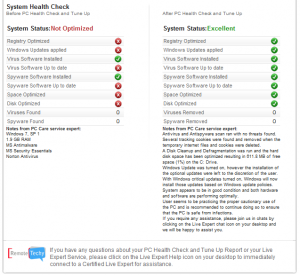
Best of luck in finding a suitable PC Support and Optimization solution. If there is anything we can do to help, please tweet us @remotetechys or into our team anytime!
]]> Windows 8
Finally, it seems like we can all expect a version of Windows thatseamlessly rides the fence between digital entertainment hub, and productivity. From the product demonstration, and all in one packaged Vizio PC’s (also announced at the show) it seems as though Windows fans can now expect a real competitor to Apple’s tightly controlled hardware/software centric design.
For those of you who may have experienced the downfalls to Windows 7, and its bloated resource requirements – keep your eye out for the opportunity to upgrade! I know we will be.
OLED TV’s
If you were to walk by the booth on the wrong angle (and were oblivious to the never ending crowd gathered around) you could almost pass right by the Samsung OLED TV display. The closest analogy we can make for them is a sheet of glass for a TV, with arguably the crispest picture at the show.
For video fanatics out there – these are worth waiting in line for!
 Smart TVs
I think it is safe to assume that the Google TV we purchased for testing, was one of the few units sold in Canada.
Based on the product demonstrations we have seen, manufacturers are expecting Smart TV’s to hit 500 million units within the next few years. Based on the sheer usability and interface design, our vote goes out to Samsung and LG.
While LG (and most other TV manufacturers it seems) is going the way of joining forces with Google TV, the interface and Nintendo WIIesq remote control are a tonne of fun to interact with.
A notably ‘cool’ feature with the LG line – is their In Store Advertising module, which is the best way we can describe the software they have created to allow small business owners to create custom in store promotions, overlaid with TV and web feeds.
Samsung on the other hand has gone a bit more traditional with their remote control technology, but has stepped away from the crowd and created their own App Market for Samsung specific applications and integrations with their version of the Digital Home
3D TV: No Goggles Required
Based on what we have seen to date – dont get your hopes up for a viable solution to be rid of your 3D TV glasses any time soon.
Not to take away from the hype, as the idea of being able to watch 3D TV with the naked eye is simply amazing. The demo’s we witnessed from overseas, independant manufacturers and even juggerant brands fell a bit flat, and seemed to cause a few headaches for quite a few CES guests.
Nexia home/office control
We at Remote Techy have been tracking digital home control technology, and until this years show have been unimpressed with the offerings.
While there were probably about a dozen different solutions being promoted to centralize control of your home/office temperature, security (from alarms to CCTV and door locks) and lighting – Nexia seemed to be the most seamless and intuitive to use.
We of course cannot speak to the setup difficulty or cost – but we cant argue with just how awesome it would be to be able to adjust and monitor your home or office while you are away.
]]> To start, I think a clear definition of what Malware actually consist of is important to better understand how you can protect yourself.
After all, regardless of the PC Security Software you use – the best line of defence is to stay informed!
Here’s the link to the full page and definition on Malware thanks to Wikipedia.
The purpose of Malware is basically to provide the shady characters of the web with access to your personal information, accounts, data and in some cases internet bandwidth for them to exploit. Infections commonly incur when pop up ads are clicked, toolbars, screen savers and even fear tactics promoted PC security software is installed.
To stay safe, it is important to remember that you should NEVER click on any ad’s that are not clearly branded as an organization you know and trust, you should never download and install any software that you do not fully understand the benefits, and risks for and you should absolutely never enter any of your social or email passwords into screen pops that request it for certain access.
Below are sure fire warning signs that you are infected, and that you need to seek help immediately.
- When you first open up a web browser – you are brought to a home page that is not what you usually see (ie. Google, MSN etc.)
- You try to run a search in your main browser, however when you do so another window pops up with the search results and high pressure, fear tactic ads.
- Your PC frequently slows down, shows foreign error message, or even crashes on a regular basis.
- You are constantly bombarded by advertisements when you do not have any web browsers open. These could be ads to install security software, or warning you that your PC might be infected.
- You see new files, new screen savers, new background images – or otherwise unusual changes to your system that you did not make yourself.
Unfortunately, PC security threats are extremely prevalent on the web and represent a huge black market industry. To ensure you stay safe – follow the above safety precautions, keep your security software, and PC up to date with the latest patches and always consult a professional like our Online PC Support team if you suspect anything is amiss.
]]> This article is made especially for those of you who have celebrated one of the various holidays this time of year and received or even gifted a new PC.
These days, PCs need a refresh every 18 months or so. That refresh can come in the form of hardware upgrades, or even just wiping it out and starting over with a fresh install of your Operating System. In any case a new PC is like a clean slate, an opportunity to properly setup and prepare your PC for prolonged use. Here are our top 7 tips:
1. Perform all Windows Updates
First things first: it is of utmost importance to catch up on all of the latest and hopefully greatest updates Microsoft has released. Even though your PC is brand new, the files that were used to install your operating system in the depot could be quite old.
In Windows 7 hit Start > All Programs > Windows Updates
2. Install an Antivirus program like Avast Free Home Edition
There is quite a debate out there on the topic of free vs. paid for Antivirus. Typically the argument of paid for is promoted by those who stand to benefit (hint hint) and backed by more robust features that stem beyond Virus and Malware protection.
At the end of day, we suggest to most of our clients that a paid for option is ideal – our stance constantly changes based on what the different vendors are releasing.
However, one thing that hasn’t changed is our stance on the best free antivirus product being Avast Home Edition. Avast regularly updates there virus definitions (the data that tells the software what to look out for) and offers cool features like Boot Scanning which runs an impressively deep virus scan before your Operating Systems boots up.
3. Remove the Free Trials that get crammed down your throat
The trend of jam packing new PCs with trial software ranging from Antivirus, to Microsoft Office, eBay, games and anything else that represents an opportunity to upsell you on something, or obtain your information for statistical marketing purposes for the vendors ecosystem.
We always remove all of this junk – and strongly advise our customers to keep them off unless there is a specific reason that compels you to opt into these programs sometime in the future.
The easiest way to do this is to select Computer > Select Uninstall Programs and comb through the list to find any programs that you do not need or include the words trial and demo. If you are unsure as to what a program does – make sure you Google it before you remove it, or if you are a Remote Techy customer – start a live chat support session with our team.
4. Turn off Aero and Adjust customer appearance settings
It is no secret that Windows Vista and Windows 7 are what we in the techy world would call resource intensive … or in regular english, pigs!
One of the big memory hogs is the Aero display – the feature that Microsoft has used to try to make their product stand above the look and feel of Apple’s Macintosh Operating System. Unfortunately, for most people who purchase reasonably priced PC’s – this means slow performance! Follow the below steps to fix this:
Right Click Computer > Select Properties > Click Advanced System Settings > Settings under Performance > Visual Effects > Custom > Check only the features shown in the image to the right.

5. Setup a mandatory page file
This little tweak often times helps increase the memory buffer used on your hard drive that helps you run programs on your PC. Typically this is automatically set but taking a few moments to force a minimum will help to simplify things – to change this follow the below process.
Right Click Computer > Select Properties > Click Advanced System Settings > Settings under Performance > Advanced > Change (under virtual memory) > Select the Custom Size radial > Set the Initial and Maximum Size to whatever the recommended amount is at the bottom of the window (see the screen shot for an example). If you have more than 1 drive, do this for each!

6. PC Performance Optimization with CCleaner
CCleaner is a free PC management tool that lets you: increase browser speeds by clearing your cache, manage startup items, perform basic registry optimization and manage your installed applications.
While this and a lot more proactive features are included and maintenance tasks automated with the Monthly PC Tune Ups included in our support programs – for those of you who are not currently customers, you can mimic part of this by downloading and installing CCleaner.
Click here to download CCleaner today – it is one of the preferred tools by our team.
7. Promise us that you won’t install any toolbars this time around!
Toolbars are the bain of any techie’s existence. Not only do 99% of them out there create security threats to your PC and interfere with your web browsing experience and the performance of your web browsers. Promise us and yourself that you will do it right this time by not installing any toolbars!
And remember, if you don’t know how to do something, or wish there was an easier way to get the instant tech answers you need check out our online tech help services perfect for small business owners in any field.
]]> If you are like me, you probably have ideas pop into your head all day – almost every day. Where you view this as a positive or not - I have found that relying on Evernote to transcribe my thoughts as they come up has been a true productivity, focus and time management saver!
Using the iPhone App, Desktop App and Chrome plugin, I am able to literally jot down any note and capture any interesting article or idea I come across online, any time and keep all of my data synced across both my mobile phone and PC. Not to mention I can also organize it all in a file structure that makes sense using the Notebook and Tagging features.
Check out the official Evernote walk through on the Web Clipper feature.
If you use you are a mobile heavy user like me – you can even try out recording your thoughts as audio clips – or capturing images of white board discussions. For me the audio is a major plus, as I tend to do an inordinate amount of thinking while I’m driving.
Here’s how I tackle it, hopefully by sharing this it will spark a few ideas of your own as to how Evernote might fit into your lifestyle…
Notebook Structure:
To keep things as simple as possible, I find that I have to rearrange/relabel my notebooks as I go… admittedly sometimes when I create a Notebook, I later forget why I named it what I named it. ah well.

The key I have found is to map your notebooks to the major themes in your day to day. For example…
>Recipes
>Client Meetings
>Prospect Meetings
>Articles about X
>Articles about Y
>Blog Ideas
>Immediate Attention/Follow Up Items
For me this makes sense – as I typically focus on the above day in and day out and am able to populate each, and assign follow up items for ideas accordingly. For really urgent matters I make sure to set a timeline in my calendar or our project management tool, Basecamp, if it is something that I need to delegate – more on this tool in later posts.
Tagging:
Whenever I add an item to Evernote, I always add a tag which summarizes the specific note or idea.
For example, if I read a cool Article about Marketing – specifically say blogging, then I tag it as Blogging and store it in the Articles about Marketing notebook.
Then the cool part is that when I am back at my desktop, and all of my notes are synced up I can view only tags specific to Blogging when I am ready to tackle our blogging initiatives.
Disclaimer: I wrote this blog in Evernote! A lot of our customers also make use of Google Docs, OneNote and similar apps. Evernote is however my personal favorite.
We would love to hear what you use to record your moments of pure genius! Also, if you found this post useful at all – don’t by shy, please share it.
]]>